

From promotion to measurable action
A complete offer journey, without a complicated checkout setup.
Merchants create shareable offers, customers claim them, and merchants verify redemption from a phone. Coupclaim connects those steps without replacing the business’s existing point-of-sale system.
- 1
Create
- 2
Share
- 3
Claim
- 4
Present
- 5
Redeem
- 6
Learn
Create an Offer
The merchant signs in and creates an offer around a clear customer opportunity. They define the value, redemption instructions, campaign and redemption dates, audience, quantity, and any useful restrictions.
Each published offer receives its own shareable destination. An offer can be a conventional discount coupon, but it can also promote an event, market appearance, subscriber benefit, giveaway, special access, or another local reason to act.
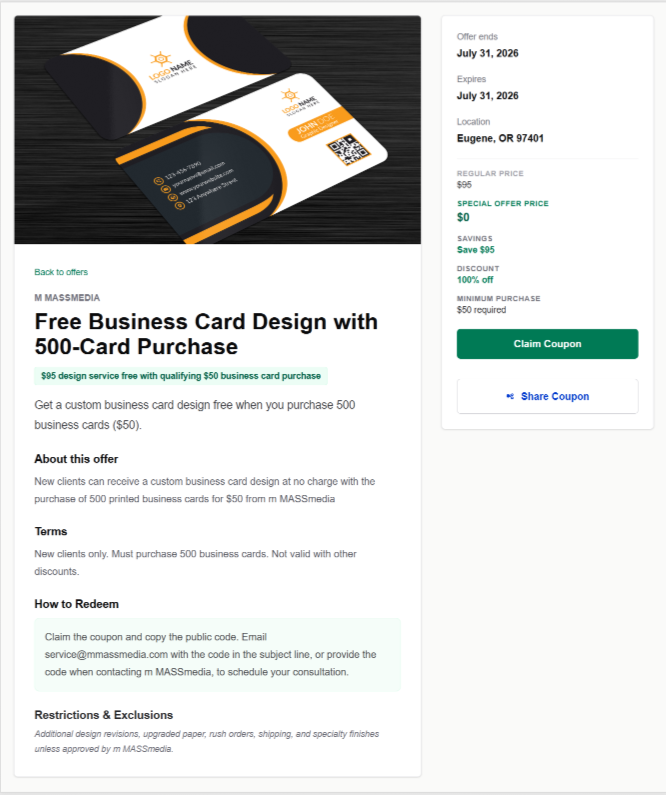
Customers Claim the Offer
A customer opens the offer and claims it. Public offers can generally be claimed without unnecessary account friction. VIP offers require the customer to sign in and have an active membership in that merchant's VIP list.
Claiming creates an individual customer coupon with its own Coupclaim code and QR code. It records interest, but it does not redeem the offer or consume redemption quantity by itself.
Two-Click Customer Redemption
The customer-presented flow keeps checkout simple while preserving merchant review and server validation.
Step 1
Open
The customer opens the claimed offer on their phone.
Step 2
Present
The customer presents the QR code or Coupclaim code to start redemption.
Step 3
Verify
The merchant checks the offer and completes the confirmed redemption.
Presenting or scanning a coupon does not bypass merchant confirmation. Coupclaim validates the coupon first, and redemption is recorded only after the merchant explicitly confirms it.
Merchant Phone and POS Redemption
The merchant opens the installed Coupclaim PWA on a compatible phone. Camera mode starts by default, with Manual Entry and keyboard-style USB scanners available as fallbacks. No specialized scanner hardware is required.
- 1. Scan or enter the code. Coupclaim loads and validates the claimed offer.
- 2. Review the result. Staff confirms the offer, customer eligibility, and status.
- 3. Tap Redeem Coupon. The server confirms and records the redemption.
- 4. Complete checkout. Staff applies the corresponding discount, item, access, or benefit in the business's normal POS or transaction process.
If the merchant's POS, online store, or booking system supports a static checkout code, the merchant can optionally include that code with the claimed offer and apply it through the existing checkout workflow. This remains a manual bridge, not an automatic POS integration.
Scan coupon
Offer and eligibility details
Manual entry available
Track Results
Coupclaim helps merchants see claims, redemptions, offer-level performance, and—where tracked—sharing activity and shared-link visits. These signals show interest and action without claiming to replace POS revenue reporting.
The operating model
The process in five lines
- Create the offer.
- Publish and share it.
- Let customers claim and share it.
- Verify redemption from a phone.
- Track what happened.
Ready to put the process to work?
Create a clear offer, share it through the channels you already use, and track the customer response.